Track your progress, take practice exams, and study the flashcards in the app.
5.8 Frequency Spectrum & Interference
- Describe how the control link and video link work, and what 2.4 GHz and 5.8 GHz each give up to get their advantages
- Identify the radio and magnetic interference sources at a real job site and mitigate them
- State the FCC limits that apply to a remote pilot's transmitting equipment and what to do when a link degrades
Your aircraft is held in the sky by two invisible things: lift, and a radio link. You spend a lot of time thinking about the first one. The exam — and your insurance company — care about the second. Almost every fly-away, every frozen video feed, and every unexplained drift starts as a radio problem or a magnetic one.
Two links, not one
There are at least four radios in a typical drone operation, and confusing them is the source of most of the confusion about interference.
- The control link, sometimes called the C2 link (command and control). It carries your stick and waypoint commands up to the aircraft and telemetry — position, altitude, battery, satellite count, warnings — back down. It is a low data rate link with high priority, engineered to be the last thing to fail.
- The video or payload link. A high data rate downlink carrying the camera image. It is normally the first thing to degrade: the picture goes blocky, then freezes, while the sticks still work perfectly.
- The GNSS receiver. The aircraft listens to GPS satellites on L1 at 1575.42 MHz. This is a receiver only — it transmits nothing — which is why GPS problems behave differently from link problems.
- Remote ID. A broadcast on Bluetooth or Wi-Fi, which lives in the 2.4 GHz band along with everything else.
Modern systems often combine the control and video links into one frequency-hopping radio that automatically picks the cleanest channel. That is genuinely good engineering, and it means the same interference that ruins your picture can eventually reach your control link too.
2.4 GHz versus 5.8 GHz
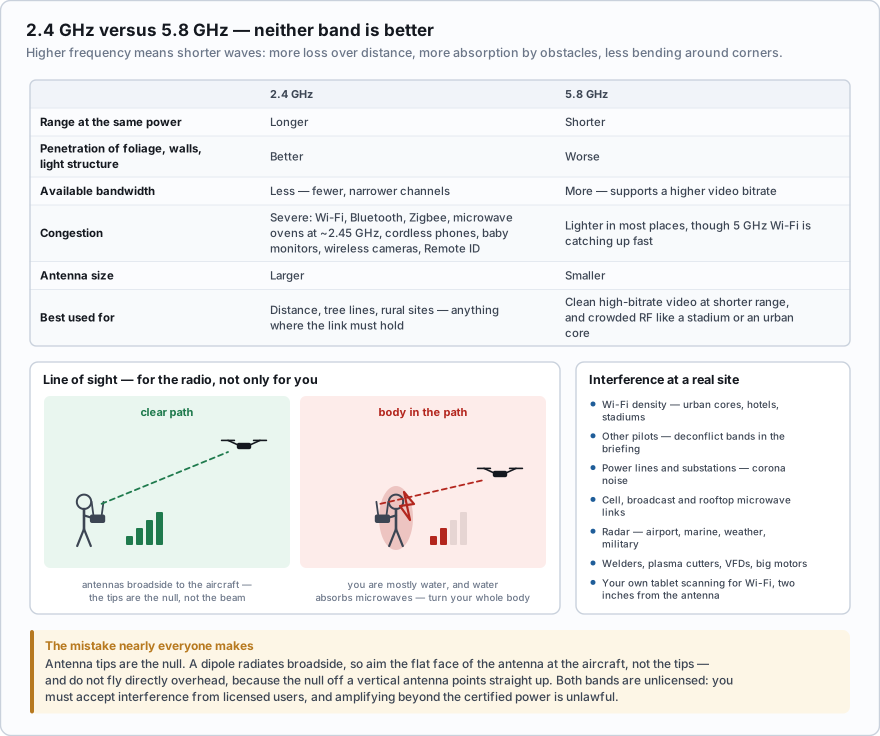
These are the two bands nearly all civil drones use. The trade between them comes down to one bit of physics: higher frequency means shorter wavelength, and shorter waves lose more energy over distance, are absorbed more by obstacles, and bend around corners less.
| 2.4 GHz | 5.8 GHz | |
|---|---|---|
| Range at the same power | Longer | Shorter |
| Penetration through foliage, walls, light structure | Better | Worse |
| Available bandwidth | Less — fewer, narrower channels | More — supports higher video bitrate |
| Congestion | Severe. Wi-Fi, Bluetooth, Zigbee, microwave ovens, cordless phones, baby monitors, wireless cameras, Remote ID | Lighter in most places, though 5 GHz Wi-Fi is catching up fast |
| Antenna size | Larger | Smaller |
| Best used for | Distance, tree lines, rural sites, anything where you need the link to hold | Clean high-bitrate video at shorter range, and crowded RF environments like a stadium or an urban core |
A microwave oven is worth calling out specifically. It runs at roughly 2.45 GHz — the middle of the band — at hundreds of watts behind a shield that is never perfect. A break trailer with a microwave forty feet from your control station is a real, measurable problem.
You are inspecting a cell tower at the far edge of a tree line, about 3,000 feet away, with intermittent foliage between you and the aircraft. Which band gives you the best chance of holding the control link?
- 5.8 GHz, because it has more bandwidth and less congestion
- 2.4 GHz, because lower frequencies travel further and penetrate foliage better
- It makes no difference — both are line-of-sight bands
Answer: B. Range and obstacle penetration are 2.4 GHz's advantages. 5.8 GHz gives you more bandwidth and a cleaner picture, but it is attenuated more by distance and foliage. Both bands are line-of-sight, but they are not equally forgiving about what is in the way.
Line of sight — for the radio, not only for you
Both bands are essentially line-of-sight. They do not follow the curve of the earth and they do not bend usefully around a building. If you cannot draw a straight clear line from your antenna to the aircraft, you are working on scraps.
- Your own body is the obstacle you forget about. You are mostly water, and water absorbs microwaves — that is how a microwave oven cooks. Turning your back on the aircraft puts a bag of RF-absorbing material directly in the path and can cost you a startling amount of signal. Turn your whole body, not only your head, and keep the controller between you and the aircraft.
- Get high and get clear. Hills, buildings, tree lines, vehicles, chain-link fence and metal roofing all shadow the link. Launch from the highest clear point you can reach.
- Multipath. Signals bouncing off metal buildings, glass curtain wall, and water arrive out of phase with the direct signal and partially cancel it. Over water and beside steel structures, expect the link to be worse than the raw distance suggests.
- VLOS and the radio path travel together. §107.31 requires unaided visual contact with the aircraft, and the geometry that keeps you seeing it usually keeps the radio path clean. When you break one, you have usually broken the other.
Antennas and polarization
A standard controller antenna is a dipole, and a dipole does not radiate from its tips. It radiates in a doughnut-shaped pattern broadside to the element, with a deep null off each end. That single fact explains the most common mistake on any job site.
Pointing the antenna tips at the aircraft is wrong. It feels right — you point things at what you want to reach — but the tips are the null, the weakest part of the pattern. Aim the broad, flat face of the antenna at the aircraft, which means holding the antenna roughly perpendicular to the line between you and the drone. On a folding controller, that generally means the antennas standing up and angled so their flat sides face the working area, adjusted as the aircraft moves.
- Directly overhead is the worst place to fly. The nulls off vertical antennas point straight up. Fly out, not up.
- Match polarization. Transmit and receive antennas should share polarization — both vertical, both horizontal, or matched circular. A mismatch costs signal for free. Some FPV systems use circular polarization (right-hand or left-hand) specifically because it resists multipath and is less sensitive to aircraft attitude, but you must match the hand at both ends.
- Inspect the antennas at preflight. A cracked housing, a bent element, or a loose connector wrecks the link. Never transmit with an antenna removed — it can damage the transmitter as well as leaving you with almost no range.
Interference sources at a real site
- Wi-Fi density. Urban cores, apartment blocks, office parks, hotels, stadiums, convention centers — hundreds of access points and thousands of client devices on 2.4 and 5 GHz.
- Other pilots. At an event with multiple crews, deconflict bands and channels in the briefing before anyone launches.
- High-tension power lines and substations. Corona discharge produces broadband RF noise, and the conductors produce strong magnetic fields as well.
- Cell towers, broadcast towers, and rooftop microwave links. A powerful transmitter close by can desensitize your receiver even on a completely different frequency.
- Radar — airport surveillance, marine, weather, and military installations. Very high peak power.
- Welding equipment, plasma cutters, variable frequency drives and large industrial motors. Construction and industrial sites are electrically noisy places. Add microwave ovens in break trailers and wireless intercoms and lav mics on film sets.
- Your own equipment. A tablet scanning for Wi-Fi two inches from the controller antenna is self-inflicted interference. Put the device in airplane mode if the app allows it.
A monthly progress flight over a mid-rise build downtown. On the first visit the video froze every time the aircraft went behind the crane, and the control link dropped bars whenever the pilot turned to answer the client. The fixes were unglamorous: move the control station from the street corner up to the parking deck for a clear line; switch the video link to 5.8 to get out of the Wi-Fi soup off the surrounding offices; put the tablet in airplane mode; brief the client that questions get answered after landing. The site is now in the operator's notes as “5.8 for video, launch from P2, expect link loss behind the crane” — worth more than any amount of equipment.
Magnetic interference and compass error
This is a different failure from radio interference and it is worth keeping separate in your head. GPS tells the aircraft where it is. The magnetometer — the compass — tells it which way it is pointing. Corrupt the heading and the flight controller will fly a perfectly correct path in the wrong direction.
The classic symptom is the toilet bowl effect: instead of holding position, the aircraft orbits in a widening circle, because every correction it makes is aimed along a heading that is not real.
- Sources: reinforced concrete and rebar slabs, steel decking, manhole covers, vehicles, parking structures, ship decks and containers, bridges, pipelines, rail lines, magnetic tool trays, loudspeakers, and power lines.
- Never calibrate the compass on or near metal. Not on the truck tailgate, not on a rebar slab, not in a parking garage. Walk out to open ground and calibrate there. A calibration performed in a distorted field teaches the aircraft a wrong model of the world — worse than no calibration at all.
- Do not calibrate reflexively. Calibrate when the aircraft asks, when you have traveled a significant distance since the last one, or after a compass error — not out of habit before every flight.
- Launch from a clean pad, and check the heading before you launch: if the aircraft icon on the map does not point where the aircraft is actually facing, do not fly.
- Expect in-flight error near structure. Flying close to a bridge truss, a tank farm, or a steel-framed building can throw the heading temporarily. Keep your distance margins honest.
Solar activity and GPS
GPS signals cross the ionosphere on their way down. The FAA's space weather program puts it plainly: “Ionized plasma in the ionosphere bends the GPS signal as it travels to the ground. During solar events, the accuracy of these signals can be degraded impairing navigational tools for aviation.” The same source notes that solar radio bursts can degrade VHF, UHF and L-band communications at any latitude.
- On a day with a significant geomagnetic storm, expect fewer satellites, slower lock, and softer position hold. Precision work — mapping, orbits, tight inspections — suffers first.
- Check the NOAA Space Weather Prediction Center forecast before a job that depends on positional accuracy, the same way you check the weather.
- Check NOTAMs for GPS interference. The military conducts GPS jamming and testing and publishes the affected areas and times.
- Know your aircraft's non-GPS mode — attitude mode, or whatever your manufacturer calls it — and practice it when nothing is at stake. The day you need it is not the day to learn it.
Your aircraft begins slowly orbiting in a widening circle instead of holding position over a concrete parking deck. What is the most likely cause?
- Control link interference from nearby Wi-Fi access points
- Compass error from the rebar in the deck, corrupting the aircraft's heading reference
- A failing battery cell causing uneven motor output
Answer: B. This is the toilet bowl effect and it is a magnetometer problem, not a radio problem. The steel reinforcement in the deck distorts the local magnetic field, so the flight controller's heading is wrong and each position correction is applied in the wrong direction. Land, move to clean ground away from structure, and recalibrate there.
The FCC rules, in plain terms
- 2.4 GHz and 5.8 GHz are unlicensed bands. You need no radio license to operate a certified drone control link or video transmitter in them. Your equipment must be FCC-certified for the band, and that certification covers a specific frequency range and a specific power level.
- You may not increase transmit power beyond the certified limit. Bolting on an amplifier or “signal booster,” flashing firmware to unlock a higher power mode, or switching a controller out of its certified region setting to gain range is unlawful. So is transmitting outside the certified band.
- The FCC enforces this against drone equipment. In 2018 it proposed a $2.86 million penalty against a hobby retailer over 65 models of drone video transmitter capable of operating outside the unlicensed and amateur bands and at higher-than-allowed power — and held that a disclaimer shifting compliance to the buyer does not work.
- Some FPV video transmitters sit on amateur radio frequencies. Using those legally requires an amateur license, and amateur rules prohibit use for business purposes. For commercial Part 107 work, stay on Part 15 certified gear.
- The unlicensed bargain: an unlicensed device must accept any interference it receives and must not cause harmful interference to licensed services. You have no protected right to a clean channel. If a licensed user is on top of you, you are the one who moves.
When the link degrades
- Stop going out. Distance is making it worse. Arrest the outbound leg first.
- Fix the geometry. Turn to face the aircraft, raise the controller, step away from the vehicle or the wall, move to higher and clearer ground.
- Fix the antennas — broadside to the aircraft, not tips.
- Change altitude slightly. A few feet up or down sometimes clears a shadow or steps out of a multipath null.
- If only the video is degrading, fly by looking at the aircraft. That is the legal requirement anyway, and the control link is the one that matters.
- If the control link is degrading, bring it home now, while you still have control. Do not wait for the failsafe to make the decision for you.
- If the link is lost, run the lost-link sequence: keep visual contact, note the position, reposition for a clear line of sight, let the failsafe do its job, and be ready to take over the instant it returns.
- Log it. Interference is a property of the site, not bad luck. Write down what happened, where, on which band, so the next crew arrives knowing.
- 2.4 GHz: longer range, better obstacle penetration, far more congested. 5.8 GHz: more bandwidth, less congestion, shorter range, worse penetration.
- Both bands are line-of-sight. Your own body between the controller and the aircraft measurably attenuates the signal.
- Antenna tips are the null. Point the broad side of the antenna at the aircraft, and avoid flying directly overhead.
- Never calibrate the compass on or near metal — rebar, vehicles, steel decks, ship hulls. The toilet bowl effect is compass error, not radio interference.
- These are unlicensed bands. Amplifying beyond the certified power, unlocking higher power in firmware, or operating outside the certified band is illegal — and unlicensed devices must accept interference from licensed users.
A phone-based Wi-Fi analyzer app will show you 2.4 and 5 GHz channel occupancy at a site in about fifteen seconds. It will not show you radar, welders or corona noise, but it costs nothing and it turns “the link felt weird here last time” into a channel choice you can defend. For serious industrial work, a handheld spectrum analyzer is a legitimate business expense.
- A drone operation runs several radios at once: the C2 control link, the video downlink, a GNSS receiver, and Remote ID broadcast — mostly crowded into the same bands
- 2.4 GHz buys range and penetration at the cost of severe congestion; 5.8 GHz buys bandwidth and quieter spectrum at the cost of range and penetration
- Both bands are line-of-sight — your body, buildings, tree lines and metal shadow the signal, and multipath off metal and water cancels it
- Antenna tips are the radiation null: aim the broad side of the antenna at the aircraft, match polarization, and do not fly directly overhead
- Compass error from rebar, vehicles, steel decks and ship structure causes the toilet bowl effect — never calibrate on or near metal
- Solar activity degrades GPS accuracy and availability; check space weather and GPS interference NOTAMs before precision work
- 2.4 and 5.8 GHz are unlicensed bands: use FCC-certified equipment, never amplify or unlock beyond certified power, and accept that you have no protected channel